

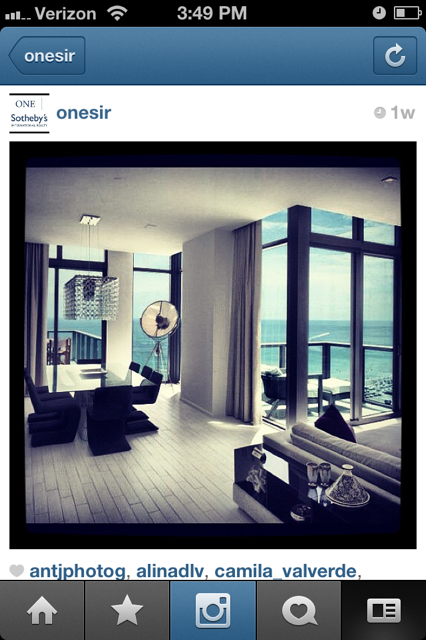
Instagram has become quite the buzz word these last few months, as the app has emerged to become one of the fastest growing social networking tools used by mobile phone users. At first only available on iPhone, Instagram recently launched an Android version that garnered millions of new followers in a short period of time. If you havent used the app yet, it is essentially a timeline where users share images that they have edited with filters of what they are doing, seeing (and even eating).Instagram was recently bought by Facebook for $1 billion, which instantly made it the envy of the tech world. In addition to being the hottest new app, its also a great tool to share stunning images of listings and properties to potential buyers.


If Youre New to Instagram Here are Some Tips to get Started - Begin Snapping Great Photos
- Download the app: Instagram is currently only available on iPhone and Android phones. Unfortunately, if you own a Blackberry this blog post wont be very useful.
- Add your Profile information: Once youve downloaded the app, click the settings icon which is in the bottom right corner. Here you can choose a username, edit your profile information, add a profile image, and set your privacy settings.

- Add Friends: By also clicking the settings icon on the homepage, you can Find Friends from your contact list, Facebook and Twitter. Click Follow next to their names so their images start appearing in your feed.
- Take a picture: On the home screen, click the middle camera icon to take photos. The screen will change to a camera viewfinder where you can snap your images. By clicking on the squares icon on the bottom left of the screen you can also choose an image from your photo library and upload to share.
- Choose a Filter: After youve snapped your picture, pick one of the 18 available filters toa dd a special effect to your photo. You can also use the sun icon at the bottom left make the picture brighter. Once you are happy with the image, press the green check mark (if youre not happy you can click on the red X and start over)
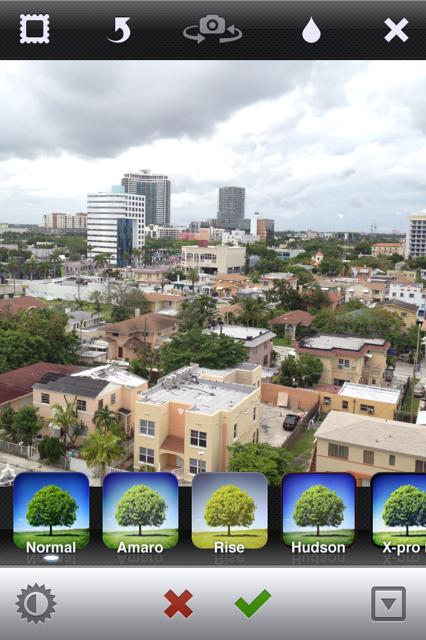
- Share your image: After you click on the green check mark, add a caption to your image to help describe it. You can also send it straight to your Facebook, Twitter, Email, Flickr, Tumbler and Foursquare. You can also click emable geotag to add the location of where you took the photo. It will scan all the places close by you.
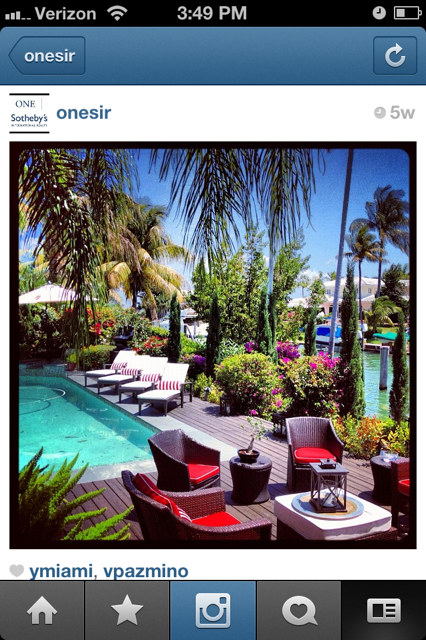
Instagram is great for showcasing great images from your listing and to attract potential buyers you can also share photos of the neighborhood, nearby parks, schools, landscaping, outdoor spaces, amenities and more (and dont forget you can use this images on your other social networks as well!) Essentially it's a virtual collage that reflects your lifestyle and attracts others to follow you.Get creative and let your inner photographer shine, happy Instagram-ing! Make sure to follow @ONESIR on Instagram for an inside peak into the most exclusive homes and properties in South Florida.
Instagram has become quite the buzz word these last few months, as the app has emerged to become one of the fastest growing social networking tools used by mobile phone users. At first only available on iPhone, Instagram recently launched an Android version that garnered millions of new followers in a short period of time. If you havent used the app yet, it is essentially a timeline where users share images that they have edited with filters of what they are doing, seeing (and even eating.)
Instagram was recently bought by Facebook for $1 billion, which instantly made it the envy of the tech world. In addition to being the hottest new app, its also a great tool to share stunning images of listings and properties to potential buyers.
If youre new to Instagram here are some tips to get started and start snapping great photos.
Download the app: Instagram is currently only available on iPhone and Android phones. Unfortunately, if you own a Blackberry this blog post wont be very useful.
Add your Profile information: Once youve downloaded the app, click the settings icon which is in the bottom right corner. Here you can choose a username, edit your profile information, add a profile image, and set your privacy settings.
Add Friends: By also clicking the settings icon on the homepage, you can Find Friends from your contact list, Facebook and Twitter. Click Follow next to their names so their images start appearing in your feed.
Take a picture: On the home screen, click the middle camera icon to take photos. The screen will change to a camera viewfinder where you can snap your images. By clicking on the squares icon on the bottom left of the screen you can also choose an image from your photo library and upload to share.
Choose a Filter: After youve snapped your picture, pick one of the 18 available filters toa dd a special effect to your photo. You can also use the sun icon at the bottom left make the picture brighter. Once you are happy with the image, press the green check mark (if youre not happy you can click on the red X and start over)
Share your image: After you click on the green check mark, add a caption to your image to help describe it. You can also send it straight to your Facebook, Twitte, Email, Flickr, Tumblr and Foursquare. You can also click emable geotag to add the location of where you took the photo. It will scan all the places close by you.
Instagram is great for showcasing great images from your listing and to attract potential buyers you can also share photos of the neighborhood, nearby parks, schools, landscaping, outdoor spaces, amenities and more (and dont forget you can use this images on your other social networks as well!) Essentially it's a virtual collage that reflects your lifestyle and attracts others to follow you.
Get creative and let your inner photographer shine, happy Instagram-ing!
Make sure to follow @ONESIR on Instagram for an inside peak into the most exclusive homes and properties in South Florida!
Instagram has become quite the buzz word these last few months, as the app has emerged to become one of the fastest growing social networking tools used by mobile phone users. At first only available on iPhone, Instagram recently launched an Android version that garnered millions of new followers in a short period of time. If you havent used the app yet, it is essentially a timeline where users share images that they have edited with filters of what they are doing, seeing (and even eating.)
Instagram was recently bought by Facebook for $1 billion, which instantly made it the envy of the tech world. In addition to being the hottest new app, its also a great tool to share stunning images of listings and properties to potential buyers.
If youre new to Instagram here are some tips to get started and start snapping great photos.
Download the app: Instagram is currently only available on iPhone and Android phones. Unfortunately, if you own a Blackberry this blog post wont be very useful.
Add your Profile information: Once youve downloaded the app, click the settings icon which is in the bottom right corner. Here you can choose a username, edit your profile information, add a profile image, and set your privacy settings.
Add Friends: By also clicking the settings icon on the homepage, you can Find Friends from your contact list, Facebook and Twitter. Click Follow next to their names so their images start appearing in your feed.
Take a picture: On the home screen, click the middle camera icon to take photos. The screen will change to a camera viewfinder where you can snap your images. By clicking on the squares icon on the bottom left of the screen you can also choose an image from your photo library and upload to share.
Choose a Filter: After youve snapped your picture, pick one of the 18 available filters toa dd a special effect to your photo. You can also use the sun icon at the bottom left make the picture brighter. Once you are happy with the image, press the green check mark (if youre not happy you can click on the red X and start over)
Share your image: After you click on the green check mark, add a caption to your image to help describe it. You can also send it straight to your Facebook, Twitte, Email, Flickr, Tumblr and Foursquare. You can also click emable geotag to add the location of where you took the photo. It will scan all the places close by you.
Instagram is great for showcasing great images from your listing and to attract potential buyers you can also share photos of the neighborhood, nearby parks, schools, landscaping, outdoor spaces, amenities and more (and dont forget you can use this images on your other social networks as well!) Essentially it's a virtual collage that reflects your lifestyle and attracts others to follow you.
Get creative and let your inner photographer shine, happy Instagram-ing!
Make sure to follow @ONESIR on Instagram for an inside peak into the most exclusive homes and properties in South Florida!
Instagram has become quite the buzz word these last few months, as the app has emerged to become one of the fastest growing social networking tools used by mobile phone users. At first only available on iPhone, Instagram recently launched an Android version that garnered millions of new followers in a short period of time. If you havent used the app yet, it is essentially a timeline where users share images that they have edited with filters of what they are doing, seeing (and even eating.)
Instagram was recently bought by Facebook for $1 billion, which instantly made it the envy of the tech world. In addition to being the hottest new app, its also a great tool to share stunning images of listings and properties to potential buyers.
If youre new to Instagram here are some tips to get started and start snapping great photos.
Download the app: Instagram is currently only available on iPhone and Android phones. Unfortunately, if you own a Blackberry this blog post wont be very useful.
Add your Profile information: One youve downloaded the app, click the settings icon which is in the bottom right corner. Here you can choose a username, edit your profile information, add a profile image, and set your privacy settings.
Add Friends: By also clicking the settings icon on the homepage, you can Find Friends from your contact list, Facebook and Twitter. Click Follow next to their names so their images start appearing in your feed.
Take a picture: On the home screen, click the middle camera icon to take photos. The screen will change to a camera viewfinder where you can snap your images. By clicking on the squares icon on the bottom left of the screen you can also choose an image from your photo library and upload to share.
Choose a Filter: After youve snapped your picture, pick one of the 18 available filters toa dd a special effect to your photo. You can also use the sun icon at the bottom left make the picture brighter. Once you are happy with the image, press the green check mark (if youre not happy you can click on the red X and start over)
Share your image: After you click on the green check mark, add a caption to your image to help describe it. You can also send it straight to your Facebook, Twitte, Email, Flickr, Tumblr and Foursquare. You can also click emable geotag to add the location of where you took the photo. It will scan all the places close by you.
Instagram is great for showcasing great images from your listing and to attract potential buyers you can also share photos of the neighborhood, nearby parks, schools, landscaping, outdoor spaces, amenities and more (and dont forget you can use this images on your other social networks as well!) Essentially it's a virtual collage that reflects your lifestyle and attracts others to follow you.
Get creative and let your inner photographer shine, happy Instagram-ing!
Make sure to follow @ONESIR on Instagram for an inside peak into the most exclusive homes and properties in South Florida!

Socials